Hi Guyys! If have some questions in your mind, don't hesitate to ask. :)
Byeee! Finals is coming up. So, it will take some time before my next post.
But don't expect that my next post will be posted here because I'll be posting some other stuff that teenagers could really ralate to. (exclude computers stuff) :)
Byeee! Hanggang sa muli! :D
/TaposNaRin
/Gatas
/020915
Saturday, 14 March 2015

GENERATIONS OF COMPUTER
Each Generation of Computer is designed based on the new technological development, resulting in better, cheaper
and smaller computers that are more
powerful, faster and efficient than their
predecessors.
1st Generation
Vacuum Tubes
Machine
language uses 0s and 1s for coding of the
instructions. The first generation
computers could solve one problem at a time. The computation
time was in milliseconds. enormous in size and required a large room
for installation. used vacuum
tubes for circuitry and
magnetic drums for
memory.
Examples: UNIVersal Automatic Computer
(UNIVAC), Electronic Numerical Integrator And
Calculator (ENIAC), and Electronic Discrete
Variable Automatic Computer (EDVAC).
2nd Generation
Transistors
The instructions were
written using the assembly language. The computation
time was in microseconds. smaller in
size compared to vacuum tubes. used magnetic
core technology for
primary memory. They
used magnetic tapes and
magnetic disks for
secondary storage.
Examples: PDP-8, IBM 1401 and CDC 1604.
3rd Generation
Integrated Circuits
The keyboard and the
monitor were interfaced through the operating
system. High-level
languages were used extensively for
programming, instead of machine language and
assembly language. The computation time
was in nanoseconds. quite small compared to the
second generation computers. multiple
transistors are placed on a
silicon chip.
Examples: IBM 370, PDP 11.
4th Generation
Microprocessors
Several new operating
systems like the MS-DOS and MS-Windows
developed during this time. This generation of
computers supported Graphical User
Interface (GUI).The computation time
is in picoseconds. smaller than the
computers of the previous generation. became widely available for
commercial purposes.
Examples: In 1981, IBM
introduced the first computer for home use. In 1984, Apple
introduced the Macintosh.
5th Generation
Artificial Intelligence
The goal of fifth generation computing is to
develop computers that are capable of
learning and self-organization. The fifth
generation computers use Super Large Scale
Integrated (SLSI) chips that are able to store
millions of components on a single chip. These
computers have large memory requirements. The fifth generation computers are based
on Artificial Intelligence (AI). They try to
simulate the human way of thinking and
reasoning.
Artificial Intelligence such as Expert System (ES), Natural Language
Processing (NLP), speech recognition, voice
recognition, robotics, etc.
CONVERTING
BINARY TO DECIMAL

DECIMAL TO BINARY

BINARY TO HEXADECIMAL

DECIMAL - HEXADECIMAL - BINARY

IN CONVERTING DECIMAL TO HEXADECIMAL OR VICE VERSA, CONVERT IT FIRST TO BINARY THEN DO THE SAME PROCEDURE.
Questions? Just ask. ;)
/GottaBeStrong
BINARY, DECIMAL, HEXADECIMAL.
Sick of Math? I SUPER FEEL YOU!
But be sick no more! Because when it comes to converting binary or decimal or hexadecimal, its just a piece of cake! I think... *Note: I am not good in Math tho. XD*
But before anything else, what is Binary? Decimal? Hexadecimal?
BINARY is a number that only includes ONES and ZEROS. A number that could be at any length. Also called as BASE-2.
DECIMAL is the numbers that we are used to seeing. It is consist of number from 0 to 9.Also called as BASE-10.
HEXADECIMAL uses 16 distinct symbols, the symbols 0-9 to represent the value of zero to nine and the letters, A to F, to represent the number 10-15. It is in the BASE-16.
If want to learn how to convert binary to decimal, binary to hexadecimal, decimal to hexadecimal or vice versa of any of those three. Just stay tune. :)
/StayingStrongForSummer
But be sick no more! Because when it comes to converting binary or decimal or hexadecimal, its just a piece of cake! I think... *Note: I am not good in Math tho. XD*
But before anything else, what is Binary? Decimal? Hexadecimal?
BINARY is a number that only includes ONES and ZEROS. A number that could be at any length. Also called as BASE-2.
DECIMAL is the numbers that we are used to seeing. It is consist of number from 0 to 9.Also called as BASE-10.
HEXADECIMAL uses 16 distinct symbols, the symbols 0-9 to represent the value of zero to nine and the letters, A to F, to represent the number 10-15. It is in the BASE-16.
If want to learn how to convert binary to decimal, binary to hexadecimal, decimal to hexadecimal or vice versa of any of those three. Just stay tune. :)
/StayingStrongForSummer
HARDWARE SPECS
Hardware Specification
- this dictates the limits and maximum capabilities of a hardware/device on a given criteria or unit of measurement.
Common Computer Hardware Specs Criteria
- Main memory
- CPU Clockrate and Wordsize
- Second memory
- Video Memory
- GPU
- Audio Adapter
- Wireless/LAN Adapter
- Display Adapter
System Requirements
- minimum hardware specs/conguration of a computer to be to run a particular computer software. (e.g. Operating System)
Any clarifications? Just speak up. :)
(c) Sir Tom
/KakayaninNatin
TYPES OF COMPUTER
There are 3 types of computer: the Hybrid, Analog, and the Digital Computer.
The Digital computer still have sub-types namely: Super, Mainframe, Mini/Midrange, and Micro computer.
There's still 2 types of Micro computer, the Personal Computer (PC) and the Mobile devices such as our cellphone etc.
here are some pictures of a computer:

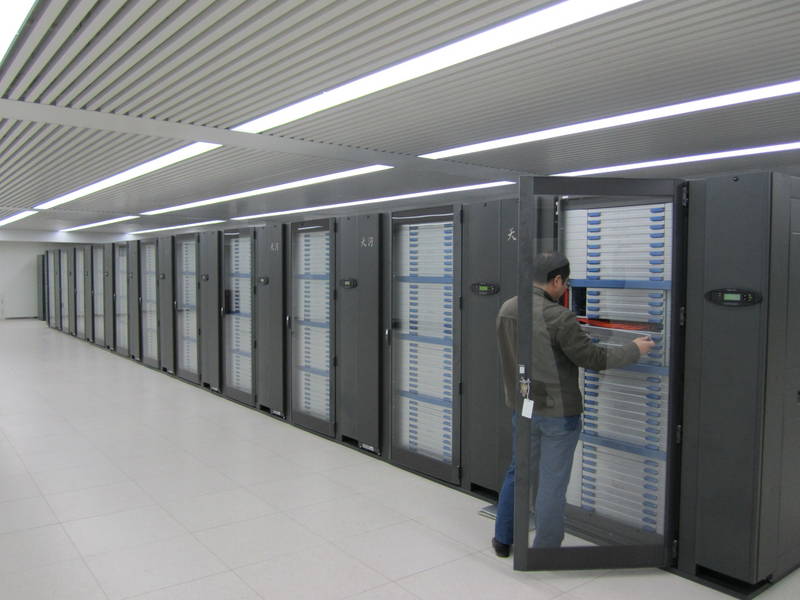


The Digital computer still have sub-types namely: Super, Mainframe, Mini/Midrange, and Micro computer.
There's still 2 types of Micro computer, the Personal Computer (PC) and the Mobile devices such as our cellphone etc.
here are some pictures of a computer:
SUPER COMPUTER
MAINFRAME COMPUTER
MIDRANGE COMPUTER
PERSONAL COMPUTER
MOBILE DEVICES
Got some questions? Just ask. :)
(c) Sir Tom
/KakayaninAngLahat
COMPUTER SYSTEM
So what is Computer System?
It is one that is able to take a set of inputs, process them, and create a set of outputs.
The Computer System is made up 2 main parts: the Hardware and the Software.
The hardware is made up of 3 parts namely:
It is one that is able to take a set of inputs, process them, and create a set of outputs.
The Computer System is made up 2 main parts: the Hardware and the Software.
The hardware is made up of 3 parts namely:
- Input and Output devices
- Central Processing Unit (CPU)
- Memory
While the software is made up of:
- Operating System (OS)
- Applications
You think the info is not enough or some details are incorrect?
Then just message me through my gmail acc and answer you questions. If questions is not unswered, I'll ask our oh-so-reliable teacher Sir Tom. Hi Sir! *kaway-kaway*
/QuestionsStillUnanswered
Subscribe to:
Comments (Atom)